
Should you receive a system-generated error message while completing or updating your enrollment in Employee Navigator, the system is indicating something is missing. Continue reading to learn how to manage common error messages.
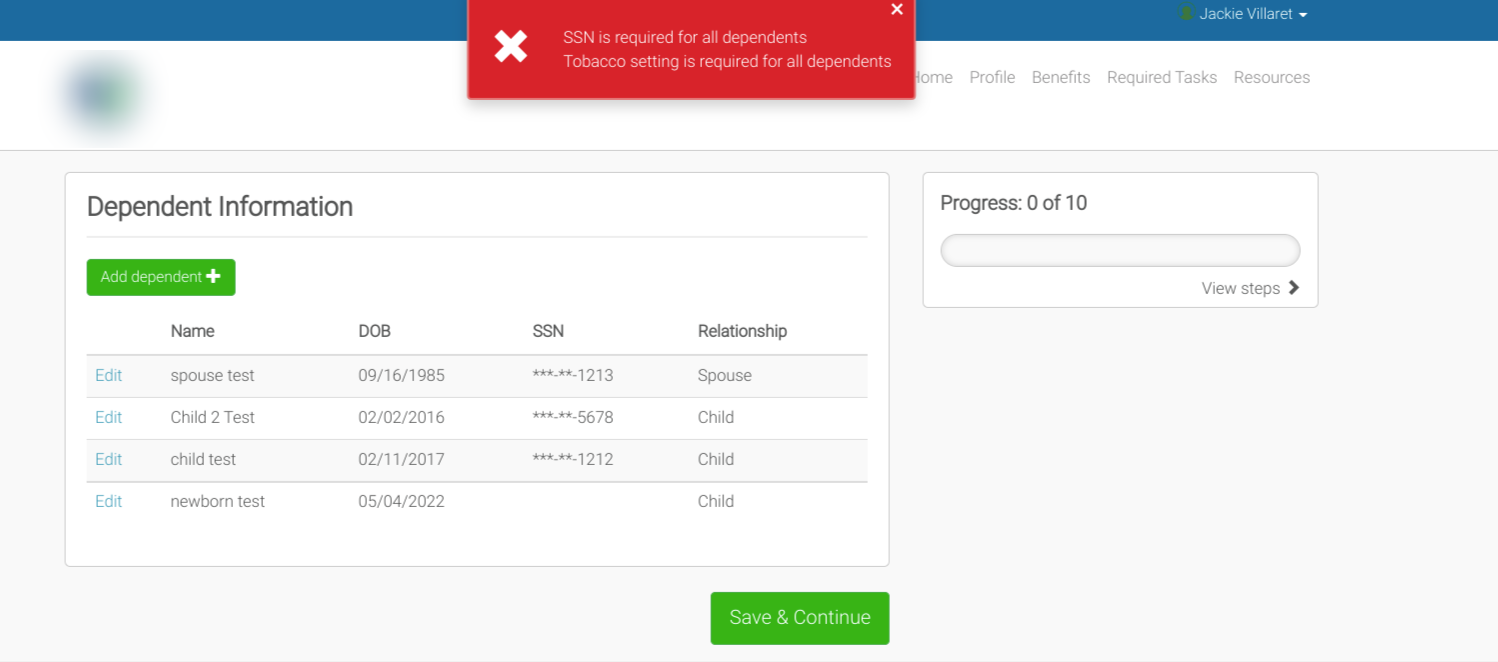
Employee Navigator will generate an error message if you attempt to proceed without updating all necessary data fields. For example, the system may require employees to indicate their tobacco status if one or more benefits rates coverage is based on tobacco use. Another common example is to include dependent Social Security Numbers if carriers use them.
Important note: To reduce or avoid error messages, it is recommended you complete all steps of the enrollment in sequence without skipping ahead.

Beginning with your profile (Step 1), ensure all questions have been answered accurately. If not, the system will promote an error message, and you will not be able to proceed. Any missed fields or information will be noted in red text.

By skipping steps, valuable information can be missed. After completing each step, click Save & Continue. The system will automatically advance to the next step. Suppose an error message displays at a later step in the enrollment related to profile information missing from Step 1. In that case, the error message may state what is needed but will not redirect you to the required field. In other instances, you will not be able to enroll in benefits.
If you can not enroll in a benefit, or elect a dependent, first double-check you have completed all profile information (Step 1) and dependent data (Step 3).

 Employee Navigator will not allow an employee to complete and submit enrollment changes if a benefit option is skipped. Either a selected or waived indication must be made for each benefit.

Once you have cleared all error messages and completed all enrollment sections, you will be able to save and submit your enrollment successfully.
